




Detección multiformato continua
Vídeos largos, Shorts, Reels, hilos y aperturas de directo se detectan automáticamente en las 7 plataformas sin depender de avisos manuales.
SocialBeacon detecta actividad pública nueva en YouTube, Twitch, Instagram, X, TikTok, Kick y Reddit, la filtra y entrega avisos impecables en los canales de tu servidor.
BotNexusDev → #🎬-nuevos-videos🟣 ¡BotNexusLive está EN DIRECTO en Twitch!
Jugando: Software & Game Dev · 420 espectadoresBotNexusDev ha subido: Arquitectura de bots en producción
youtube.com · Previsualización nativa de vídeo lista para reproducirNuevo hilo técnico de @botnexusdev en X
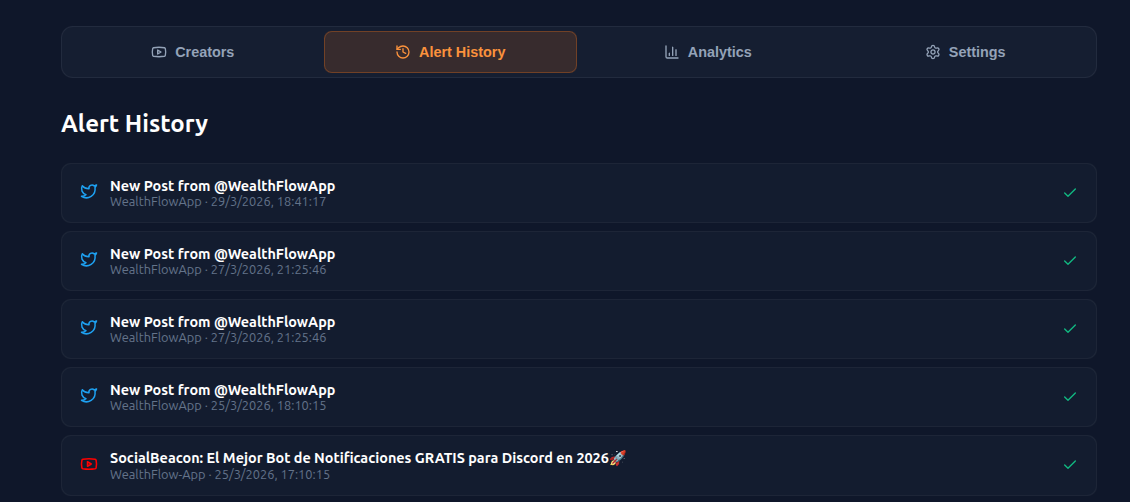
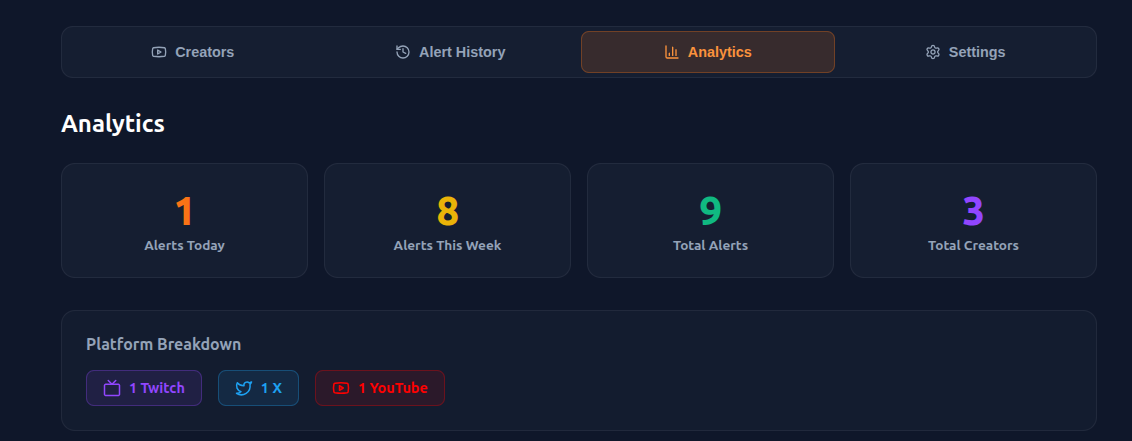
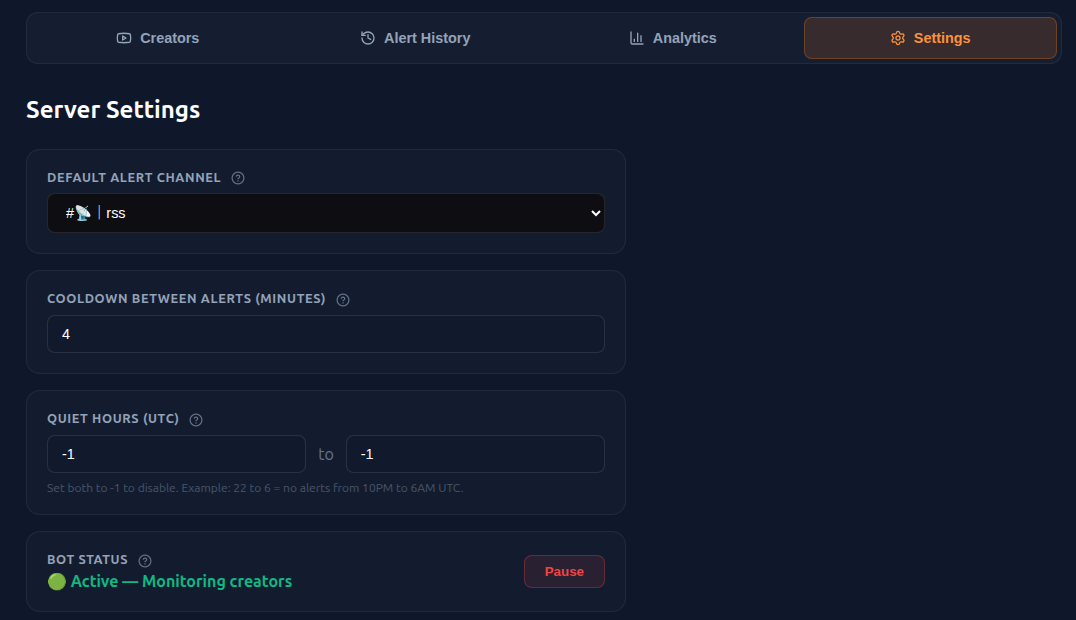
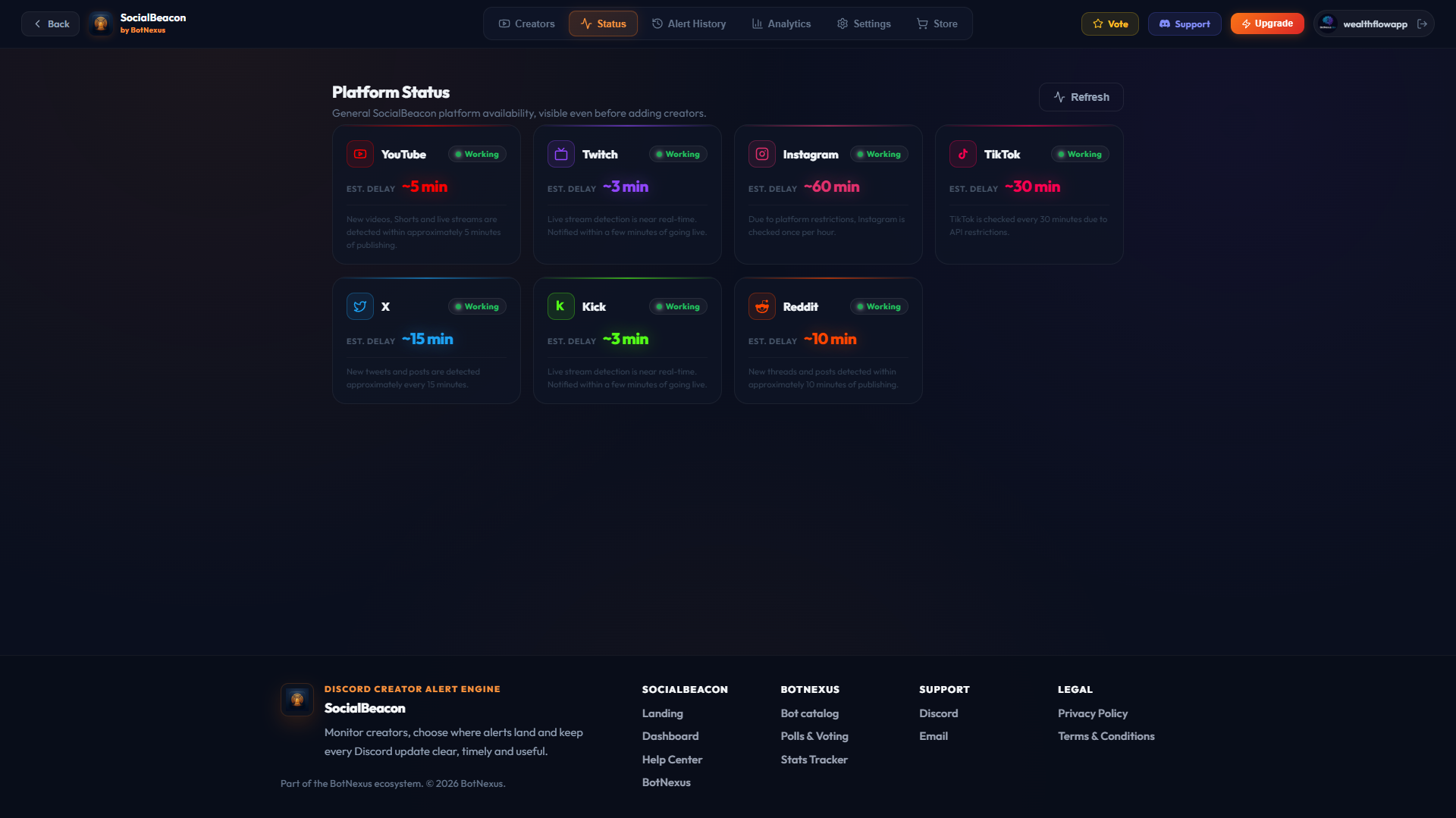
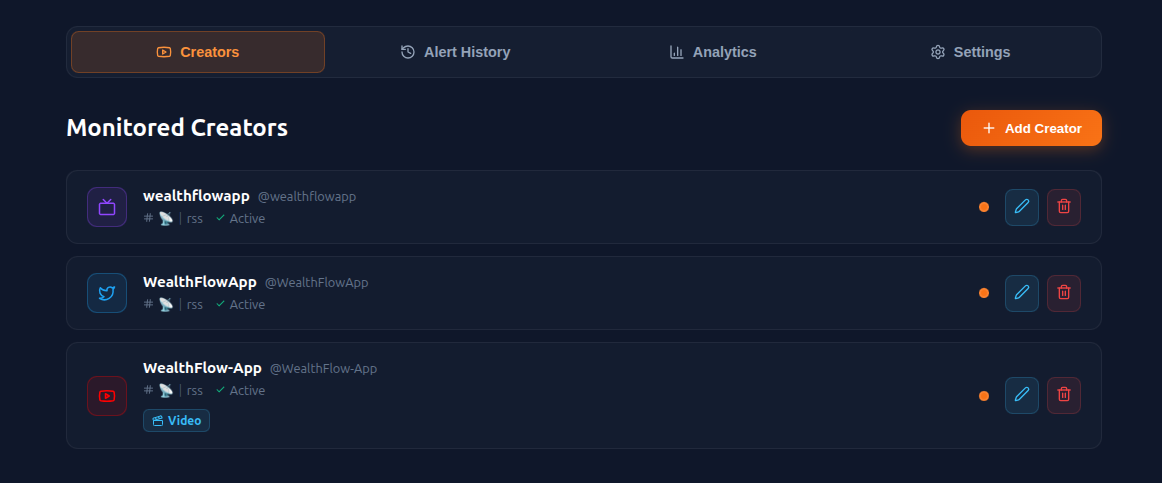
x.com · Enlace limpio al post sin ruido en el canal generalComprueba cómo aterrizan las alertas en tus canales según el formato elegido y explora el panel web donde tu equipo gestiona creadores, historial y analíticas.
 youtube.com
Gestiona la lista de creadores, revisa el historial de envíos, consulta analíticas y comprueba el estado de las 7 plataformas desde una sola interfaz.
Cada pieza de SocialBeacon resuelve un problema real de moderación y orden dentro de servidores activos.
Vídeos largos, Shorts, Reels, hilos y aperturas de directo se detectan automáticamente en las 7 plataformas sin depender de avisos manuales.
Separa directos en #streams, subidas en #videos y publicaciones en #social. Cada creador publica exactamente donde corresponde.
Alterna entre enlaces con previsualización nativa de Discord o tarjetas Embed con miniatura, categoría, espectadores y color propio.
Notifica a @StreamPing cuando arranca un directo importante y entrega actualizaciones secundarias en modo silencioso.
Descarta reintentos de red, ediciones menores y perfiles privados para garantizar que tu comunidad solo reciba contenido accesible y único.
Verifica al instante si el bot puede ver, escribir e insertar enlaces en cada canal de destino antes de que se pierda una alerta.
No necesitas abrir el navegador para las tareas del día a día: añade creadores, lanza alertas de prueba y verifica el estado directamente desde tu canal de administración.
/alerts addAlta instantánea con verificaciónRegistra cualquier creador público indicando plataforma, usuario, canal y rol en segundos.
/alerts testSimulación real sin esperar al creadorEnvía una alerta de prueba al canal configurado para comprobar diseño, menciones y permisos.
/alerts statusTelemetría y salud en el chatConsulta la capacidad de tu plan, los creadores activos y el estado de conexión de cada red.
Sin tokens de API propios, sin webhooks complejos y sin tocar archivos de configuración.
Autoriza el bot en el servidor de Discord que administras para activar los comandos slash y el panel web.
Indica qué cuentas públicas quieres seguir y decide en qué canal de Discord debe aterrizar cada una.
SocialBeacon detecta cada publicación o directo nuevo, filtra duplicados y entrega el aviso al instante.
Todos los planes incluyen alertas ilimitadas 24/7, enrutado por canal y menciones por rol. El plan solo determina cuántos creadores puedes monitorizar a la vez.
El límite total es el número de cuentas o canales que puedes seguir a la vez. Las plataformas intensive son más caras de monitorizar, así que tienen su propio tope por servicio — pero solo cuentan mientras no superes el total de tu plan.
Para probar el bot sin compromiso
Para comunidades pequeñas
Para comunidades que crecen
Para hubs y medios
| Qué incluye cada plan | Free0€ | Basic1.99€ | Pro4.99€ | Advanced9.99€ |
|---|---|---|---|---|
| Alertas ilimitadasPublicaciones siempre, sin límite de volumen | ||||
| Enrutado por canal | ||||
| Menciones por rol | ||||
| Panel completoCreadores, estilo y diagnóstico | ||||
| Canales estándarYouTube, Twitch, Kick, Reddit | 2 | 4 | 10 | 24 |
| Cuentas intensiveX, Instagram, TikTok | 1 | 2 | 5 | 12 |
| Creadores en total | 3 | 10 | 25 | 60 |
| SoporteDiscord y email |
Precios en EUR con facturación mensual por servidor. Todas las alertas y notificaciones en directo son ilimitadas 24/7. «Creadores en total» es el número de cuentas o canales que puedes seguir a la vez. Los límites por plataforma son máximos por servicio dentro de la capacidad total de tu servidor.
Es el número total de cuentas o canales de creadores distintos que puedes monitorizar a la vez en tu servidor de Discord (por ejemplo, 10 creadores equivale a hasta 10 canales de YouTube, streams de Twitch, cuentas de X, etc. vigilados al mismo tiempo). Todas las alertas, publicaciones y notificaciones en directo son ilimitadas 24/7: SocialBeacon nunca limita las notificaciones ni cobra por volumen de mensajes.
Sí. El plan Free cubre hasta 3 creadores por servidor con alertas ilimitadas 24/7: una cuenta intensive (X, Instagram o TikTok) más dos cuentas estándar (YouTube, Twitch, Kick o Reddit). Sube de plan solo cuando tu comunidad necesite más capacidad.
No. SocialBeacon solo monitoriza creadores públicos: canales, directos y feeds de publicaciones abiertos. Las cuentas privadas se omiten a propósito, de modo que tus alertas siempre reflejan contenido que tu comunidad puede abrir realmente.
Los creadores se monitorizan de forma continua. Las alertas se publican en cuanto se detecta contenido público nuevo: sin revisiones manuales y sin perderse ninguna premiere.
Sí. Dirige cada creador a su propio canal de Discord y decide qué alertas deben mencionar a un rol.
Puedes combinar creadores hasta el límite total de tu plan. Las plataformas estándar (YouTube, Twitch, Kick, Reddit) permiten hasta 4, 10 o 24 canales cada una. Las sociales (X, Instagram, TikTok) permiten hasta 2, 5 o 12 cuentas cada una para garantizar una entrega muy rápida.
No. Añade el bot, ejecuta /alerts add y elige los creadores. Todo también se gestiona visualmente desde el panel.
Sí. Los planes se facturan mensualmente por servidor y sin permanencia. Baja de plan o cancela desde el panel en un clic: conservas tu plan actual hasta el final del periodo de facturación y tu servidor vuelve al plan Free (3 creadores) en lugar de perder el acceso.
Cada novedad, cada directo y cada publicación, en el canal donde tu comunidad ya vive.
Añadir SocialBeacon a Discord — gratis